Each tool works offline on your own data, and comes with a demonstration project and a self-test. Introductory prices in US dollars are shown with each tool, with the sector suites for organisations below.
Health and service planning
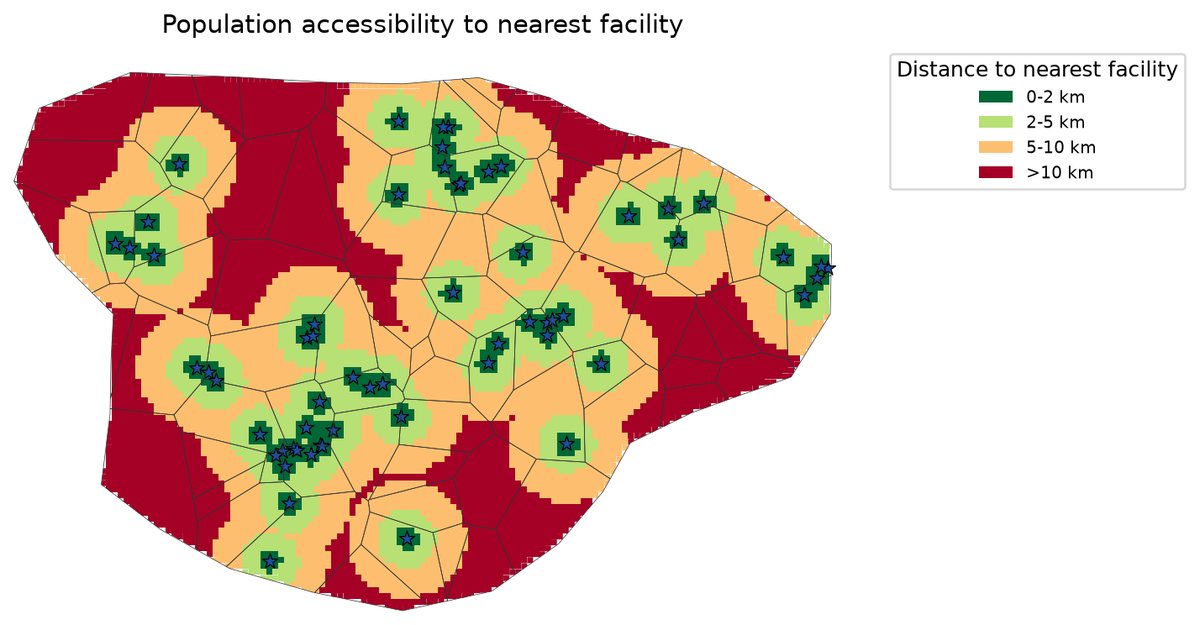
Share of people within reach of a functional facility, by ward. Real output, invented demo data
A-TAB Spatial Access Analyser
Who can reach a health facility, and where should services go next?
Measures geographic access to health facilities for every community in a state or district, shows who is left out, and ranks wards by priority with a suggested action for each.
Distance from every population cell to the nearest facility and, with a travel-time surface you supply, travel time on foot or by vehicle.
Coverage within the distance or time bands you choose, for every ward, LGA and area type; catchment population and load for every facility.
Rural, peri-urban and urban classification, with equity indicators for each ward.
A ward priority index with a stability check on the weights, and a suggested intervention for each ward (new facility, outreach, more capacity or monitor), with the reason.
Data checks that catch duplicate facilities, points outside the area and gaps or overlaps between boundaries, so every total adds up exactly.
A report, an Excel workbook, maps, GIS layers and an interactive offline dashboard.
Network edition: travel time along your own road layer, road speeds calibrated from GPS tracks, and road investment and rainy-season scenarios: which upgrades, bridges or new roads bring the most people within reach of care, within a budget.
Health and service planning
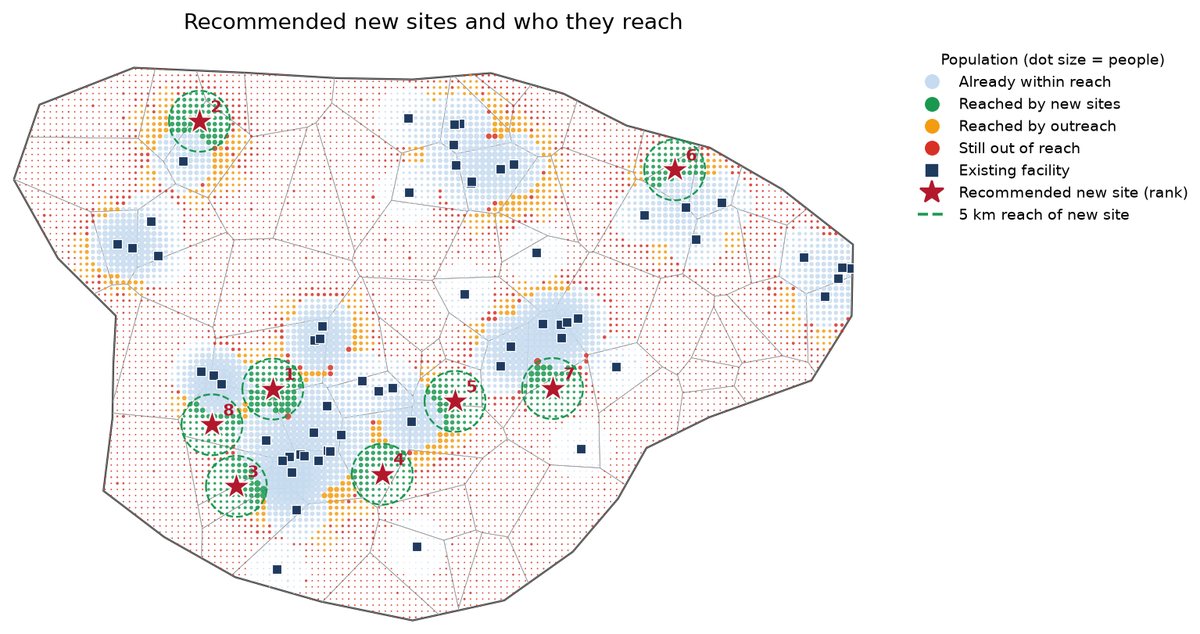
Recommended new sites and the people each one would reach. Real output, invented demo data
A-TAB Facility Site Planner
Where should the next facilities or outreach sites go?
Finds the locations for new facilities or outreach sites that bring the most people not yet served within reach, and plans monthly outreach for the people who remain out of reach.
The best 1 to N new sites by distance or by travel time, optimised as a set, with the people gained by each additional site.
Advice for phased building: if sites will be built one at a time, it names the best site to build first.
Your own candidate locations, or a regular grid of candidates; existing facilities just outside the area are counted.
An outreach plan for people still out of reach: session sites, the facility or mobile team that serves each one, and a monthly visit plan within team capacity.
Excel, maps, GIS layers and a single-file report; every total reconciles.
Health and service planning
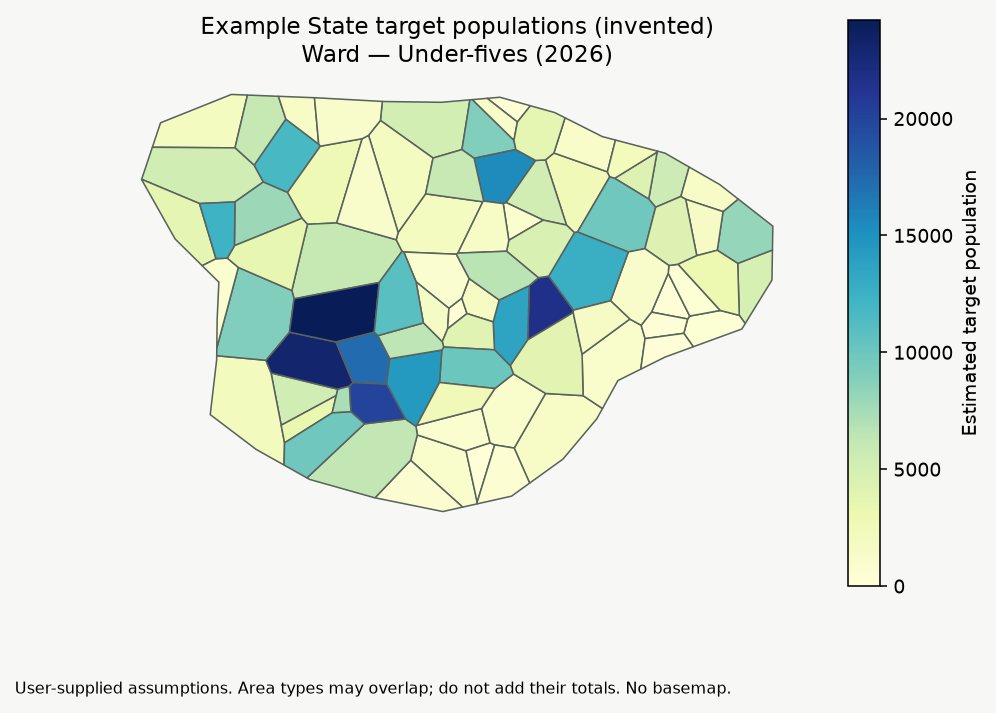
Estimated under-fives by ward for 2026, from a population grid. Real output, invented demo data
A-TAB Target Population Estimator
How many people does each area need to reach, and how sure are we?
Estimates target populations (for example under-fives or women of reproductive age) for wards, settlements and facility catchments, projects them to the year you plan for, and compares them with official figures.
Population from area totals, household counts × household size, population rasters, grids or settlement points, or Spatial Access Analyser catchments.
Growth to a common target year, with the base year and the source of every rate and proportion recorded.
Any target group you define, with low and high estimates from the ranges you give.
Comparison with official denominators, flagging areas where they differ by more than your threshold; official scaling optional, raw estimates always kept.
A microplanning workbook, maps, GIS layers and a report.
Health and service planning
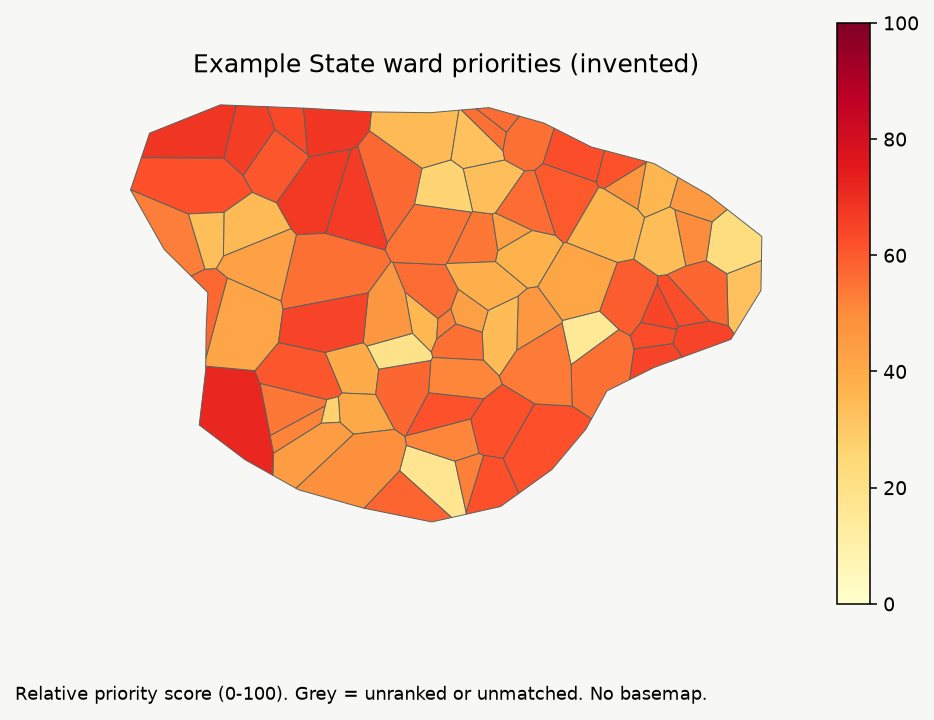
Wards ranked by a weighted priority score. Real output, invented demo data
A-TAB Priority Area Ranker
Which areas come first, and can we explain why?
Ranks areas on any indicators, in any sector, with a transparent score, a breakdown for every area and a check on how much the ranking depends on the weights.
Your own indicators, with direction (higher or lower is worse), scaling, handling of missing values, groups and weights.
A priority score and class for every area, with the contribution of each indicator.
A stability check that varies the weights and reports how far each rank can move.
Warnings when two indicators measure almost the same thing.
Maps from your boundaries, a GIS layer, CSV tables and an offline report.
Agriculture and food security
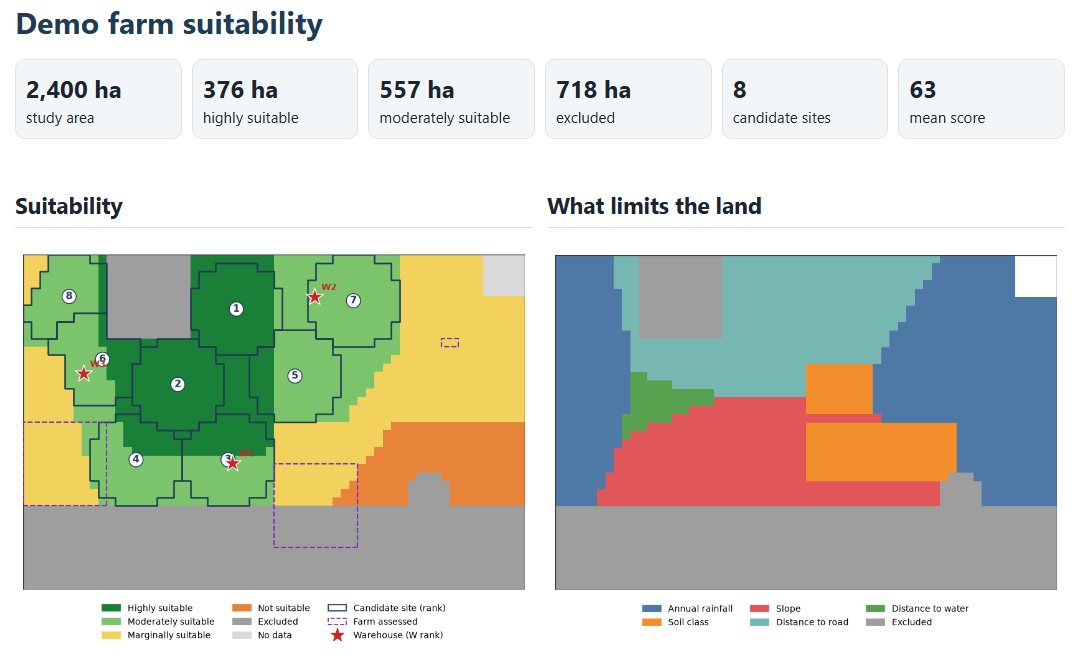
Land suitability, candidate sites and what limits the land. Real output, invented demo data
A-TAB Land Suitability Planner
Where should we farm, store or process, and how good is this farm?
Land suitability, candidate sites, farm assessment and warehouse siting from your own map layers, in one desktop tool.
Suitability from your layers (rainfall, temperature, soil, slope, distance to roads and water) with ideal and acceptable ranges, weights and exclusions such as protected areas or steep land.
A map of what limits each place, and hectares in each suitability class.
The best compact parcels of the size you need, ranked, with a check on how much the ranking depends on the weights.
One printable page per farm: suitability, crops ranked from editable crop profiles, and warnings where map data is too coarse for the farm.
Warehouses, collection centres or processing sites placed to reach the most production.
Eleven example crop profiles to start from, to be adapted with a local agronomist.
Agriculture and food security
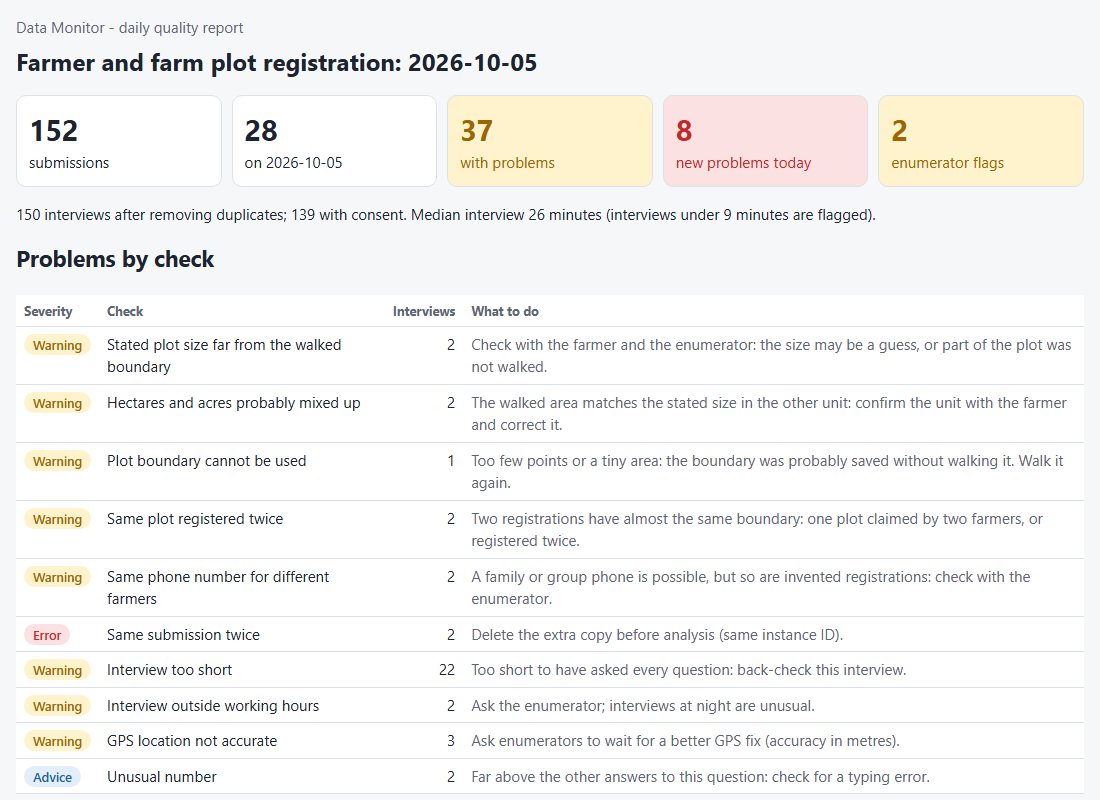
Daily monitor report with the farm plot checks. Real output, invented demo data
A-TAB Farm Survey Checker
Will this farm survey work, and are the farm figures coming in believable?
Checks farmer registration, crop-cut and input-distribution forms for KoboToolbox and ODK before fieldwork, and checks the farm data every day while it comes in.
Form Check with farm rules: sizes and weights without a unit, plot sizes that are only stated and never measured, yields without grain moisture; a score out of 100 and a fix for every finding.
Farm checks on the submissions: stated plot sizes against the walked boundary, acres and hectares mixed up, boundaries saved without walking, the same plot registered twice, yields outside the range for each crop, quantities above the programme's package, one phone number for several farmers.
All the standard daily checks too: duplicates, rushed interviews, GPS problems, data without consent and enumerators who stand out, with progress and a back-check sample.
The Agriculture kit built in: farmer and plot registration, crop-cut yield and post-distribution monitoring forms, with scenarios, monitor settings, practice data with an answer key, an enumerator manual, supervisor and pilot-testing protocols and training slides.
Field data and operations
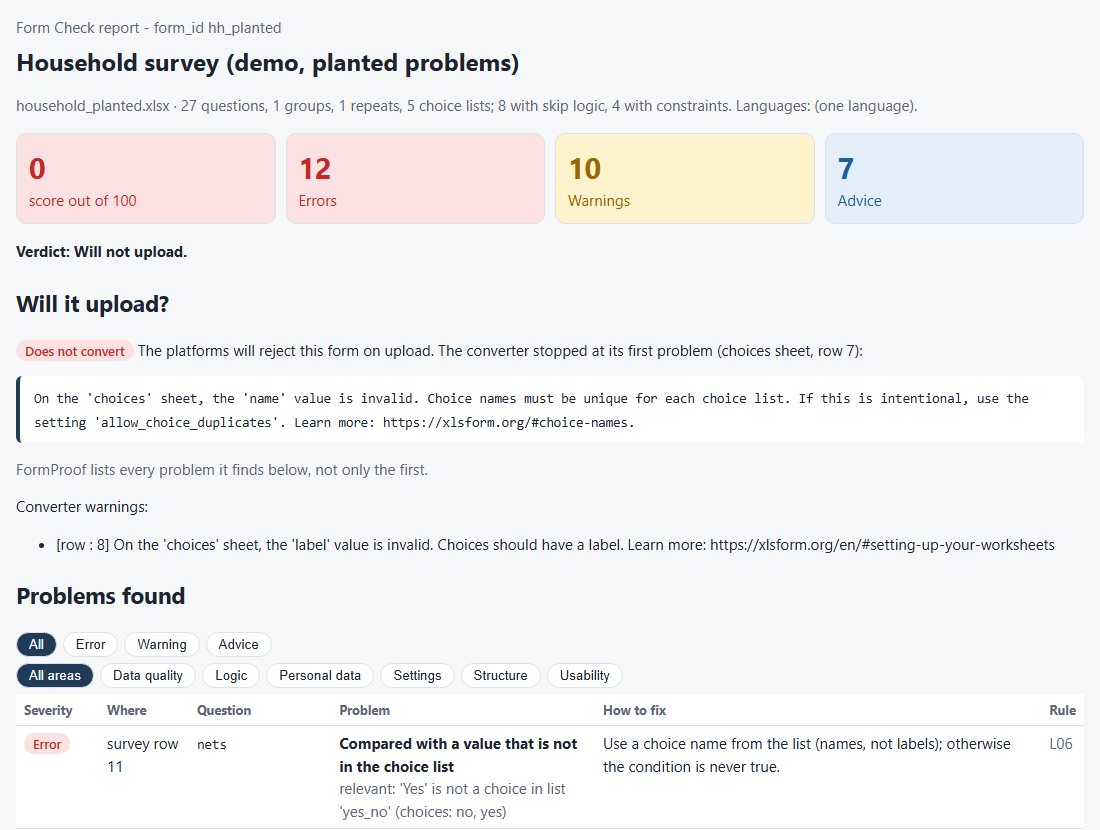
Form check report: will the form upload, and what to fix. Real output, invented demo data
A-TAB Survey Form Checker
Will this form work in the field, and is the data coming in good?
Checks KoboToolbox and ODK forms before fieldwork, tests their skip logic with example respondents, and checks the submissions every day while data collection runs.
Form Check: 46 rules on structure, logic, usability, data quality, settings and personal data, with a score out of 100 and a fix for every finding.
Scenario tests: example respondents confirm what is asked, hidden, refused or calculated; automatic tests find questions that can never be reached.
Data Monitor: daily checks for duplicates, rushed interviews, GPS problems, data without consent, straight-lining and enumerators who stand out, with progress and a back-check sample.
Three sector kits (Health, M&E and GIS field): three ready forms each, with scenarios, monitor settings, practice data, an enumerator manual, supervisor and pilot-testing protocols and training slides.
Field data and operations
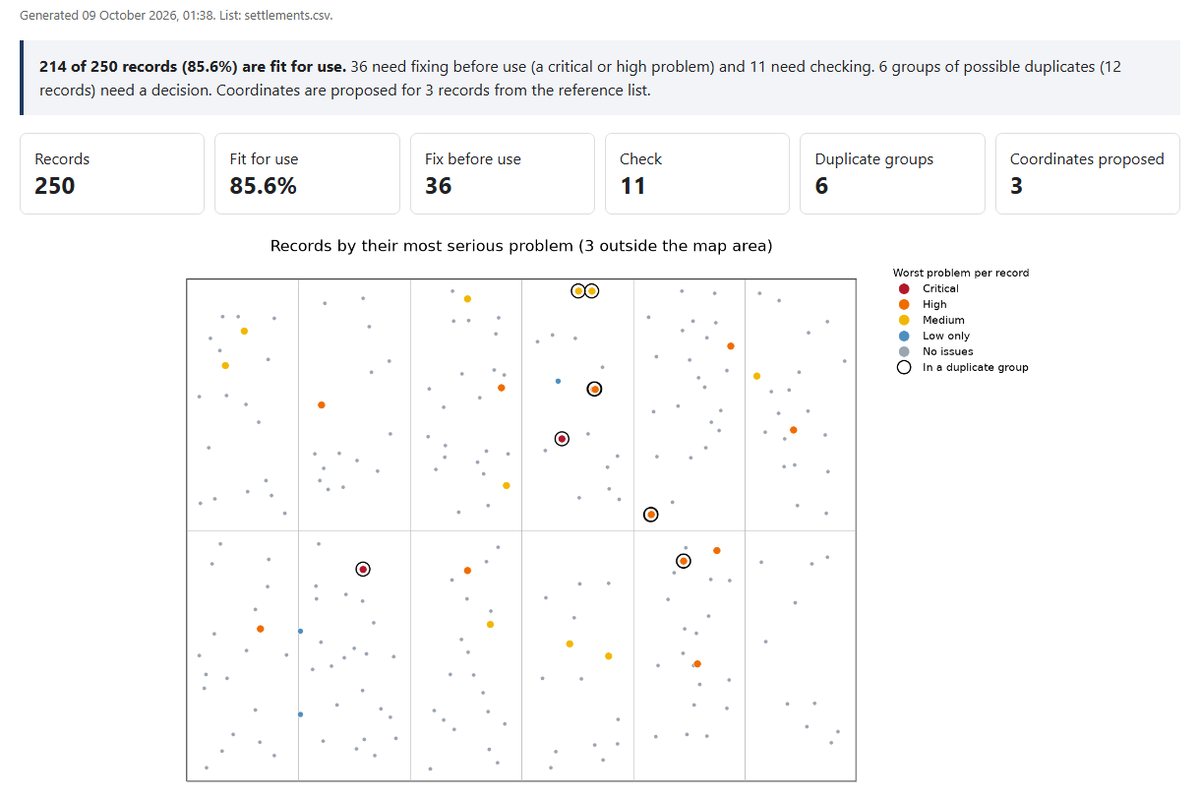
Location list check: what is fit for use and what is wrong. Real output, invented demo data
A-TAB Location Data Checker
Is this facility or settlement list ready to use?
Checks lists of facilities, settlements or other places before they are used, groups likely duplicates and proposes coordinates, without ever changing the original values.
24 checks in four levels of severity: coordinates, administrative areas, duplicates, content and reference matching.
Name matching that ignores case, accents, punctuation and generic words, while keeping apart names that differ only by a number.
Duplicate groups for review, and coordinates proposed from a reference list you supply.
Optional corrections in new columns, with an audit trail.
A report, Excel, CSV and GIS outputs.
Field data and operations
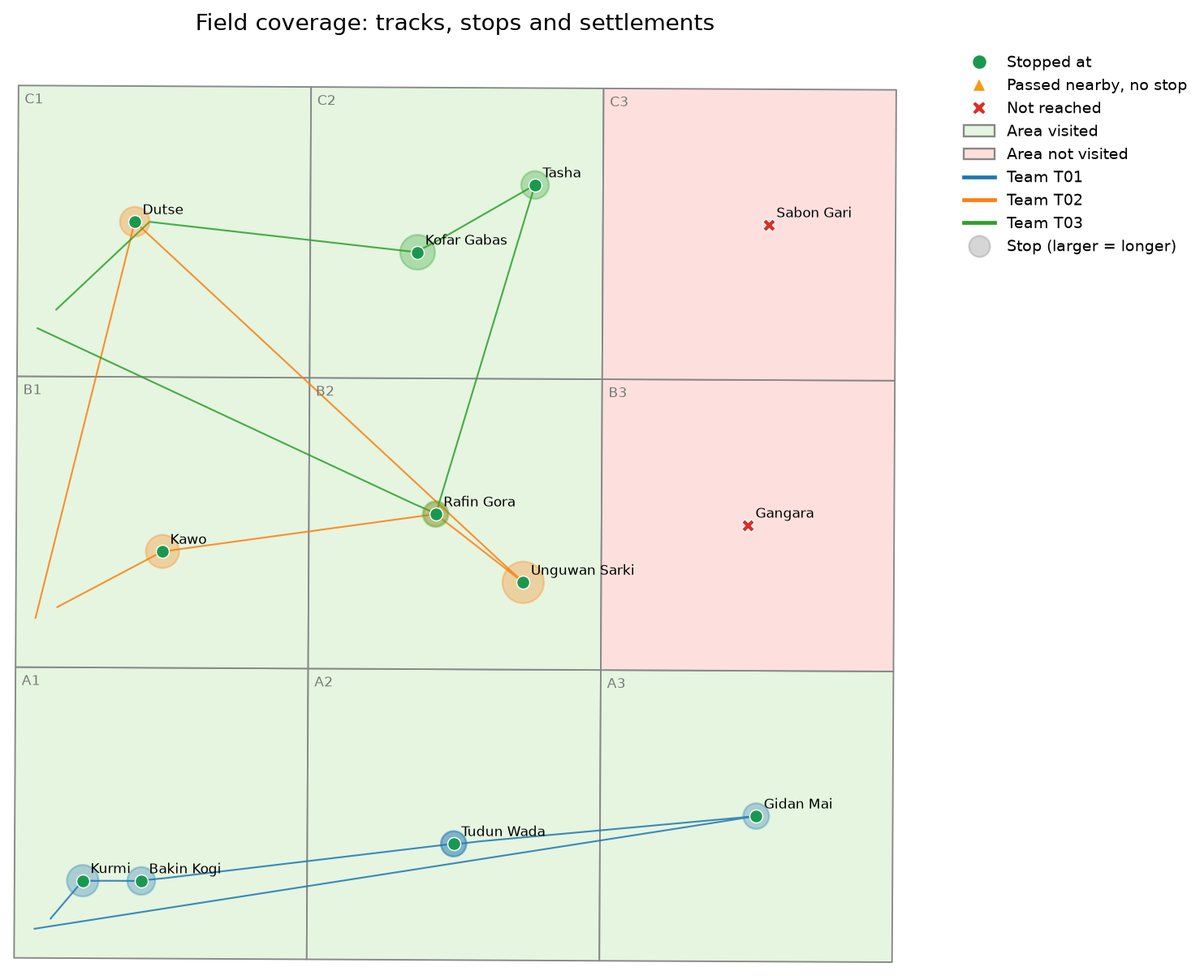
Field coverage: where teams went and the places they missed. Real output, invented demo data
A-TAB Field Coverage Tracker
Where did the field teams go, and what did they miss?
Turns raw GPS tracks from field teams into answers: where teams went, how long they stayed, which settlements and areas were reached or missed, and how good the tracking data was.
Reads many tracker files at once and sets aside unusable points with the reason.
Stops, visits and time spent at each settlement; settlements and target areas reached or missed; passes without a stop.
Coverage map, daily stop timelines, team tables and the longest stops.
Data-quality figures for every team and device.
A single-file report, Excel and GIS outputs.
Monitoring, evaluation and reporting
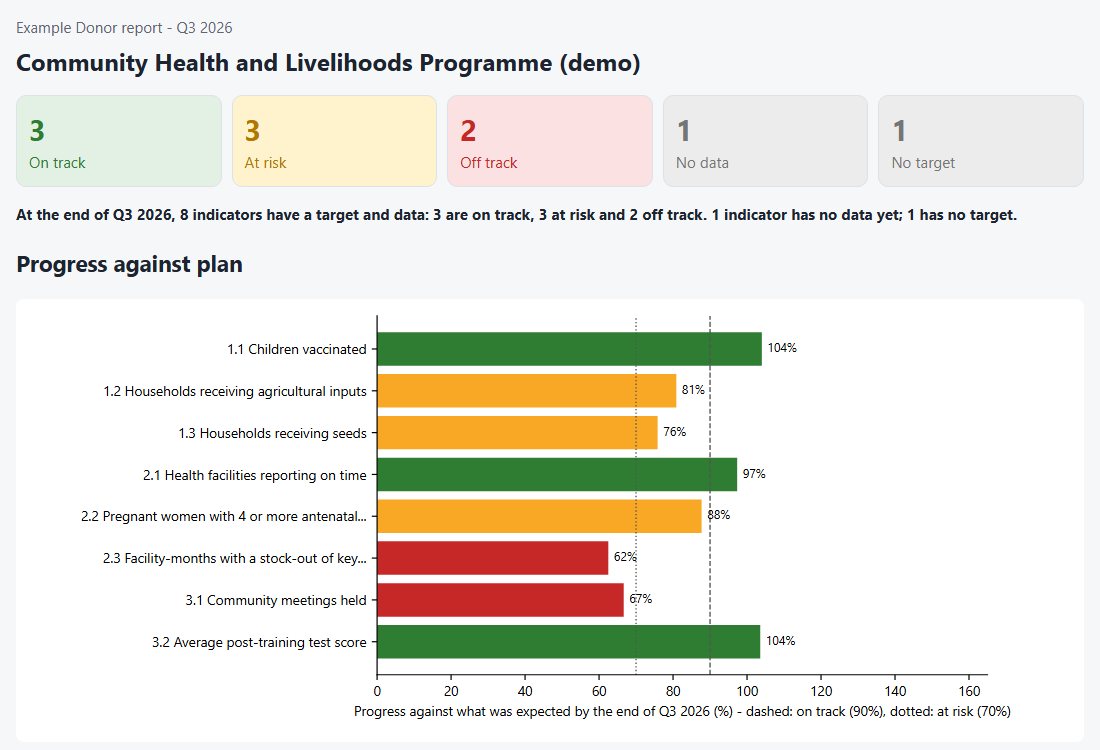
Indicator progress against plan, ready for a donor report. Real output, invented demo data
A-TAB Donor Report Builder
From monitoring data to a donor-ready report, with figures you can trust.
Turns programme monitoring data in Excel or CSV into indicator tables, status against targets, a dashboard and Word and PDF reports, with every calculation tested against known answers.
Indicators as sums, unique counts, latest values, maxima, ratios and means, by period and year to date, without double counting.
Targets, expected progress, achievement and status; disaggregation with small-number protection.
Written commentary built only from the results, with space for the team's reasons and actions.
Excel workbook, editable Word report, PDF report and an offline dashboard.
An organisation roll-up across projects.
Introductory prices: one tool
Essentials
$64one person, one-off
Location Data Checker, Survey Form Checker, Farm Survey Checker
Yours to keep, with 12 months of updates; then $24 a year
Up to 5 people: $182
Nigeria: $59 + 7.5% VAT ($63.43); renewal $19, 5 people $177, each + VAT
Introductory prices for our first customers, in US dollars. Buyers in Nigeria pay $5 less, plus 7.5% VAT, which is shown on the invoice. For buyers outside Nigeria, prices exclude any VAT or sales tax that applies in their country. Desktop tools are ordered by email for now: we send an invoice, then the installer and your licence. More people, several organisations or a quotation for a tender: enquiries@atabinformatics.info.
Knowledge and skills
Workflow Kits
Tested workflows for analysts who use AI assistants: the A-TAB AI Workflow Kit for GIS (from $24), the A-TAB Survey & Questionnaire Kit
($29) and the A-TAB Proposal & Grant Kit
($25).